
పఠనం చేయడానికి రెండు మార్గాలు
Theodia మీరు ఎలా సమీపించినా గ్రంథానికి అనుగుణంగా నిర్మించబడింది. మీ మూడ్కు సరిపోయే మోడ్ ఎంచుకోండి — లేదా session మధ్యలో మారండి.
- Focus mode — కొత్త శారీరిక బైబిల్లా చదవండి. శుభ్రమైన పేజీ, విశాలమైన మార్జిన్లు, పక్కనే ఉండే చిన్న వచన సంఖ్యలు, paragraphsలో పేర్చిన పాఠ్యం. Highlighting, links, బటన్లు ఏమీ లేవు — కేవలం పాఠ్యం, అంతరాయం లేకుండా. Bhakti పఠనం, public reading, memorization, లేదా గ్రంథాన్ని databaseగా కాకుండా పుస్తకంలా అనుభవించాలనుకున్నప్పుడు సరైనది.
- Study mode — బైబిల్ పండితుడిని బయటకు తీయండి. ప్రతి వచనం ఒక doorway: tap చేసి cross-references తెరవండి, translations పోల్చండి, commentary చదవండి, లేదా మూల భాష డేటాను తనిఖీ చేయండి. అన్ని apparatus ఒక tap దూరంలో ఉన్నాయి, మరియు పుర్తిగా offline.
బైబిల్ పఠనం, పుర్తిగా offline
Theodia ఉనికికి కారణం: నిజమైన, వేగవంతమైన, ad-free Bible reader ఇది instantaneously తెరిచినప్పుడే పనిచేస్తుంది — network connection, login, subscription ఏదీ అవసరం లేదు.
-
యాప్లో bundled తొమ్మిది బైబిల్ అనువాదాలు. Planeలో,
basementలో, SIM card లేని ఫోన్లో యాప్ తెరిచినా — bundled
translations ఇప్పటికే ఉంటాయి, పఠనం తక్షణం.
- Public domain: KJV, Strong's numbersతో KJV (KJVx), WEB.
- Modern English: BSB (Berean Study Bible).
- Translation-oriented: ULT (UnfoldingWord Literal Text), UST (UnfoldingWord Simplified Text).
- Hebrew interlinear: OHGB (Open Hebrew Greek Bible) with Strong's-aligned data.
- Transliteral Bible: TRLIT, Strong'sతో TRLIT (TRLITx).
- in-app catalog నుండి మరిన్ని install చేయండి. మేము bundle చేయని translation (లేదా bundle చేసిన కొత్త revision) కావాలంటే, Resources screen నేరుగా GitHub release నుండి తీసుకుంటుంది. Account, store transaction లేవు — public release tag వైపు యాప్ను చూపించండి, ఫైలు app's private storageలో download అవుతుంది.
- Parallel Bible view. రెండు translations side by side, verse by verse చదవండి. translation comparison లేదా literal-vs-dynamic tension (ULT next to UST, KJV next to BSB, etc) కు useful. Pairing మీ ఇష్టం — in-app translations లో ఏదైనా ఎంచుకోండి.
- ప్రతి translationలో ఏ single verse పోల్చండి. Compare screen ఒక వచనాన్ని అన్ని installed Biblesలో ఒకే viewలో చూపిస్తుంది.
Study, with the tools built in
Theodia reader మీద study tools అంటించిన app కాదు. అదే offline-first design apparatus — commentaries, lexicons, cross-references, morphology —కు extend అవుతుంది, కాబట్టి study flow flightలో ఉన్నట్లే desk వద్దా పనిచేస్తుంది.
- రెండు commentaries, bundled (Scholar mode). Matthew Henry's complete commentary మరియు AIC (AI Generated Commentary) app తో ship అవుతాయి. ఏ verse tap చేసినా Henry మరియు AIC instantaneously, offline కనిపిస్తాయి.
- Strong's-aligned lexicon, bundled (Scholar mode). Strong's number, English gloss, లేదా interlinear viewలో tap చేసి ఏ పదాన్నైనా lookup చేయండి. Bundled TRLIT (Transliteral Bible) lexicon Hebrew మరియు Greek entries definitions, transliterations, parsing dataతో cover చేస్తుంది. Additional lexicons in-app catalog నుండి available.
- ప్రతి verseకు cross-references (Scholar mode). cross-reference database project built అయినప్పటి నుండి same. Verse tap → related verses; related verse tap → its related verses. Graph dense మరియు lost అవ్వడానికి worth.
- మూల భాషల మీద morphology మరియు word data (Scholar mode). Hebrew మరియు Greek source text parsing dataతో ship అవుతుంది, కాబట్టి OHGB లేదా TRLITలో word tap చేస్తే part of speech, root, tense, voice, mood కనిపిస్తాయి — pastors మరియు language studentsకు కావాల్సినవి.
- Distraction-free reading కోసం Focus Mode. Clean single-bible view chrome strip చేసి text మాత్రమే మిగులుస్తుంది. Verse tap-and-hold చేస్తే menu తిరిగి వస్తుంది.
- Devotional library, offline. Classic devotional bundled — Smith's Believer's Daily Remembrance — calendar-style pickerతో today's entry చదవండి లేదా ఏ date కైనా jump చేయండి.
ఎన్సైక్లోపీడియా, built in మరియు expandable
Theodia appలో full biblical encyclopedia వచ్చేలా ship అవుతుంది, మరియు in-app catalog నుండి more classic reference works చేర్చవచ్చు. ప్రతి article searchable, offline readable, మరియు మీ libraryతో connected.
- Kitto’s Cyclopedia of Biblical Literature (KIT), bundled. People, places, events, topics మీద thousands of articles — app install అయిన వెంటనే available, download లేదా account కావలసినది లేదు.
- ఎన్సైక్లోపీడియాల్లో search. Entry పేరు ద్వారా lookup చేసి articleకు నేరుగా jump చేయండి. Results single search screen నుండి every installed encyclopedia మీద పనిచేస్తాయి.
- Linked articles మరియు verses. Encyclopedia entries related articles మరియు cite చేసిన Bible passagesకు link చేస్తాయి. Link tap చేస్తే entry లేదా verse open అవుతుంది — మీ స్థానం తప్పకుండా.
- catalog నుండి మరిన్ని install చేయండి. Additional classic encyclopedias — McClintock and Strong, Hastings’ Dictionary of the Bible, International Standard Bible Encyclopedia, మరియు more — Settings → Manage Resources కింద in-app resource catalog నుండి direct గా download.
Deep word study కోసం నిఘంటువులు
Bundled Strong's-aligned lexicon కి అదనంగా, Theodia classic Bible dictionaries install మరియు search చేయనిస్తుంది. Names, places, doctrines, theological terms చదువుతున్న verse లేకుండా lookup చేయండి.
- Strong's-aligned lexicon, bundled. Interlinear viewలో ఏ Hebrew లేదా Greek word tap చేసినా Strong's number, gloss, transliteration, parsing data కనిపిస్తాయి.
- Bible dictionaries. Bibles, commentaries, encyclopedias ఎలా add చేస్తారో same way in-app catalog నుండి reference works చేర్చండి.
- Verse-aware lookups. Study modeలో, ఏ verseకైనా dictionary panel open చేస్తే installed dictionaries నుండి relevant entries కనిపిస్తాయి.
- మిగతా అన్నింటితో cross-linked. Dictionary entries verses, encyclopedia articles, lexicon entriesకు తిరిగి link చేస్తాయి, కాబట్టి ఒక wordను library యొక్క ప్రతి layerలో follow చేయవచ్చు.
ప్రార్థన సహచరుడు, built in
Theodia bookmarked verseకు మించిన dedicated prayer helper కలిగి ఉంది. Prayer requests track చేయండి, personal routines build చేయండి, classic prayers మరియు creeds follow చేయండి, prayer journal keep చేయండి, guided sessions walkthrough చేయండి — అన్నీ offline, మీ డివైస్ మీదే. Prayer tools ప్రతి user modeలో కనిపిస్తాయి; AI assistantతో prayers generate చేయడానికి Scholar mode అవసరం.

- Prayer requests. మీరు ప్రార్థిస్తున్నది — కుటుంబం, healing, work, church — list ఉంచండి. Foldersతో organize, tag, priorities మరియు reminders set, God move అయినప్పుడు answered mark చేయండి. Running notes request develop అయ్యేటప్పుడు updates log.
- Prayer routines. మీ సొంత step-by-step prayer path build చేయండి: a passage to read, a creed to recite, your prayer list, a hymn, a moment of silence, a devotional — any orderలో, per-step durationsతో. Routine pin చేసి Prayer home screenకు చేర్చండి, morning/evening prayer ఒక tap దూరం.
- Creeds మరియు fixed prayers. The Lord's Prayer, the Apostles' Creed, the Nicene Creed, the Shema, the Gloria Patri, మరియు more — read చేయడానికి లేదా read aloud. Own fixed prayers create చేసి routinesలో stepsగా reuse.
- Guided prayer sessions. Audio-guided sessions step by step time of prayer walk చేస్తాయి — prompts, scripture, reflection — adjustable pacing మరియు optional ambient soundతో.
- Prayer journal. మీరు pray చేసినది, gratefulగా feel చేసినది, God teach చేసినది capture చేయండి. Entries requestsకు back link, journal templates starting prompt.
- Prayer timer. Open-ended prayer కోసం simple timer, presets, start/end bells, ambient sounds (rain, ocean, wind, fire, birds), candle లేదా breathing guide, optional journal prompt తో time's up.
- Lectionary schedules. Daily scripture reading plan — Old Testament, Psalm, Epistle, Gospel — classic lectionaries నుండి follow, లేదా own schedule build.
- AI-generated prayers (optional, Scholar mode). Theophilus enabled అయితే, persona మరియు mood ఎంచుకుని personal prayer generate చేయండి request లేదా journal entry నుండి — fixed prayerగా save లేదా journalకు append.
- catalog నుండి మరిన్ని install. Creeds మరియు fixed prayers, guided sessions, lectionaries, routines అదనంగా in-app catalog నుండి download, లేదా own package మరియు share.
వినడానికి ప్లేలిస్ట్లు
Scriptureను వినేదానిగా మార్చండి. Bible passages, audio tracks, మరియు own textతో playlists build చేసి orderలో play చేయండి text-to-speech లేదా MP3 audioతో — మీ commute, walk, లేదా wind-down కోసం personal audio Bible. ప్రతి user modeలో available.

- Own playlists build చేయండి. Bible passages, audio files లేదా URLs, plain text tracks చేర్చండి. Reorder, batch-add list of references ఒక్కసారి, categories మరియు tagsతో organize.
- Full playback controlsతో play. Play, pause, shuffle, repeat (all లేదా one), adjustable speed, sleep timer. Resume చేయండి playlist left చోట.
- Per-track voices. ప్రతి trackకు వేరే TTS voice ఎంచుకోండి, లేదా varying reading "random favorite" voice. Parenthetical text మరియు verse references read aloud control.
- offline పనిచేస్తుంది. Bible passage tracks installed translations నుండి read; audio tracks download మరియు deviceకు cache, connection లేకుండా play.
- Verseకు jump చేయండి. ఏ track tap చేసి passage Bible readerలో open చేయండి, follow along లేదా study continue.
- Share మరియు import. Playlists JSON లేదా Theoscriptగా export, others shared import, GitHub నుండి playlist plugins install.
PDFలు, appలో read మరియు organized
Own documents Theodiaలో bring చేయండి. Import, categorize, read PDFలు Bible పక్కనే — device మీద store, offline work. Standard మరియు Scholar modesలో available.
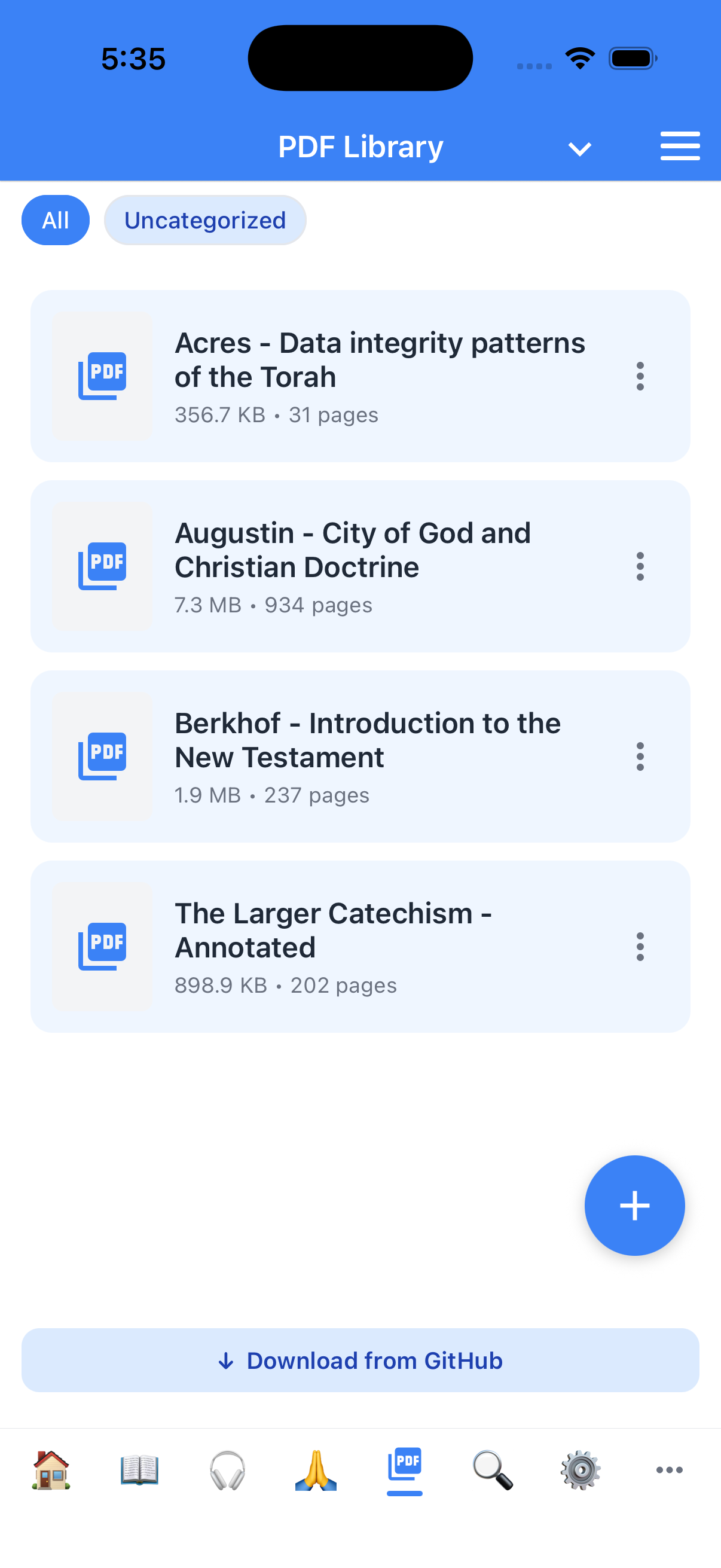
- Import మరియు organize. PDFs tab tap, + buttonతో device నుండి PDF import, browsing కోసం category assign.
- Page navigation. First/previous/next/last page jump, page number tap grid of pages, external keyboard arrows.
- Zoom మరియు bookmarks. Zoom in/out reset, named bookmarks per PDF save. ప్రతి PDF own bookmark list ఉంటుంది.
- Search, contents, text view. Searchable text available అయితే within PDF search, built-in table of contents browse, current page plain text open copy/share/study notes కోసం.
- Listen మరియు resume. PDF page TTSతో aloud read, any PDF left చోట right reopen. Listen/search searchable text install అయినప్పుడు enable.
- Scholar extras. Scholar modeలో, community library పక్కన GitHub నుండి packaged PDFs download.
శోధన, మీరు expect చేసేలా
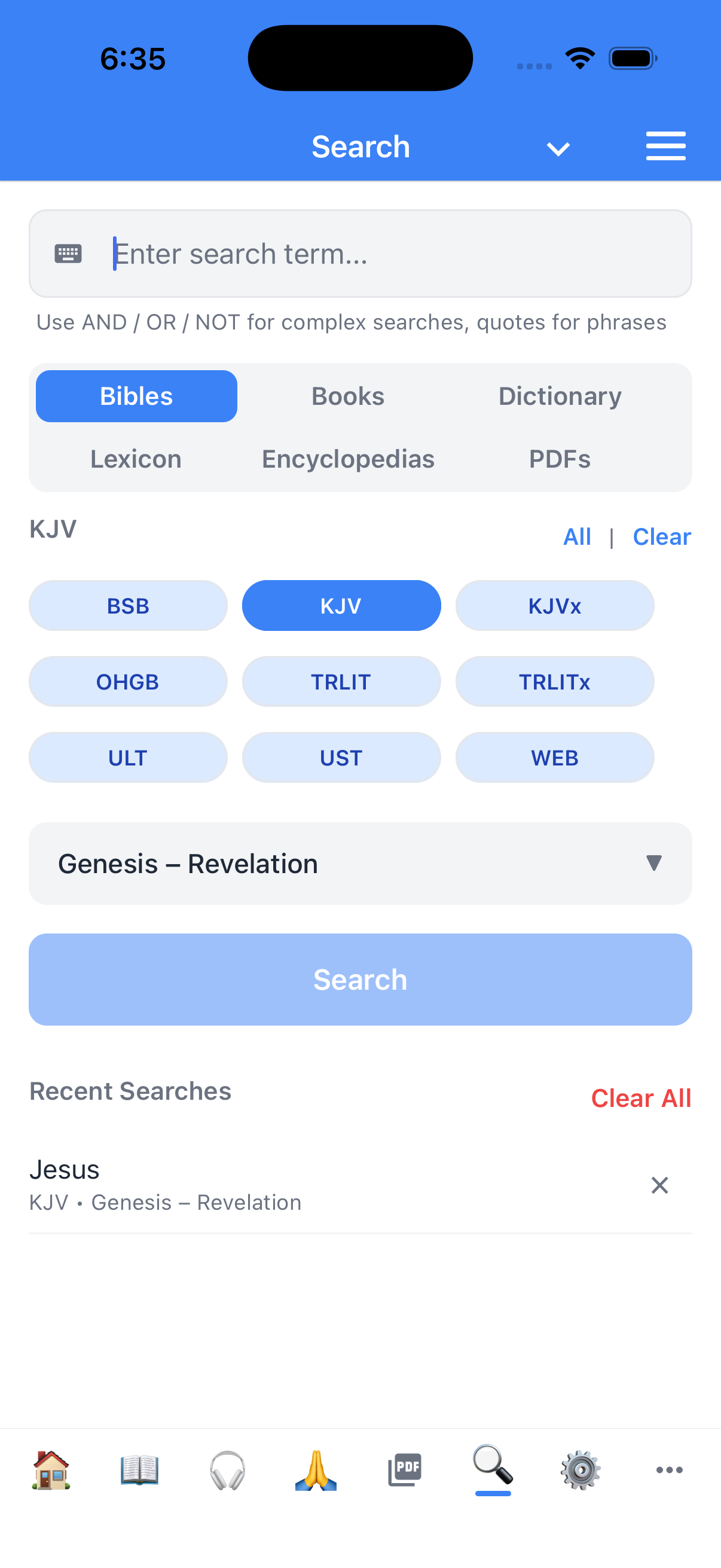
- ప్రతి translationలో full-text search ఒక్కసారి. Word లేదా phrase type; results screen hits grouped by book and chapter, matching verse contextలో.
- Translation ద్వారా filter. BSB interlinearలో Greek word "agape" search చేయాలంటే చేయవచ్చు.
- Result నుండి verseకు jump. One tap మీరు readerలో ఉంటారు, verse highlighted.
బుక్మార్క్లు, highlights, మరియు notes — అన్నీ మీవే, అన్నీ local
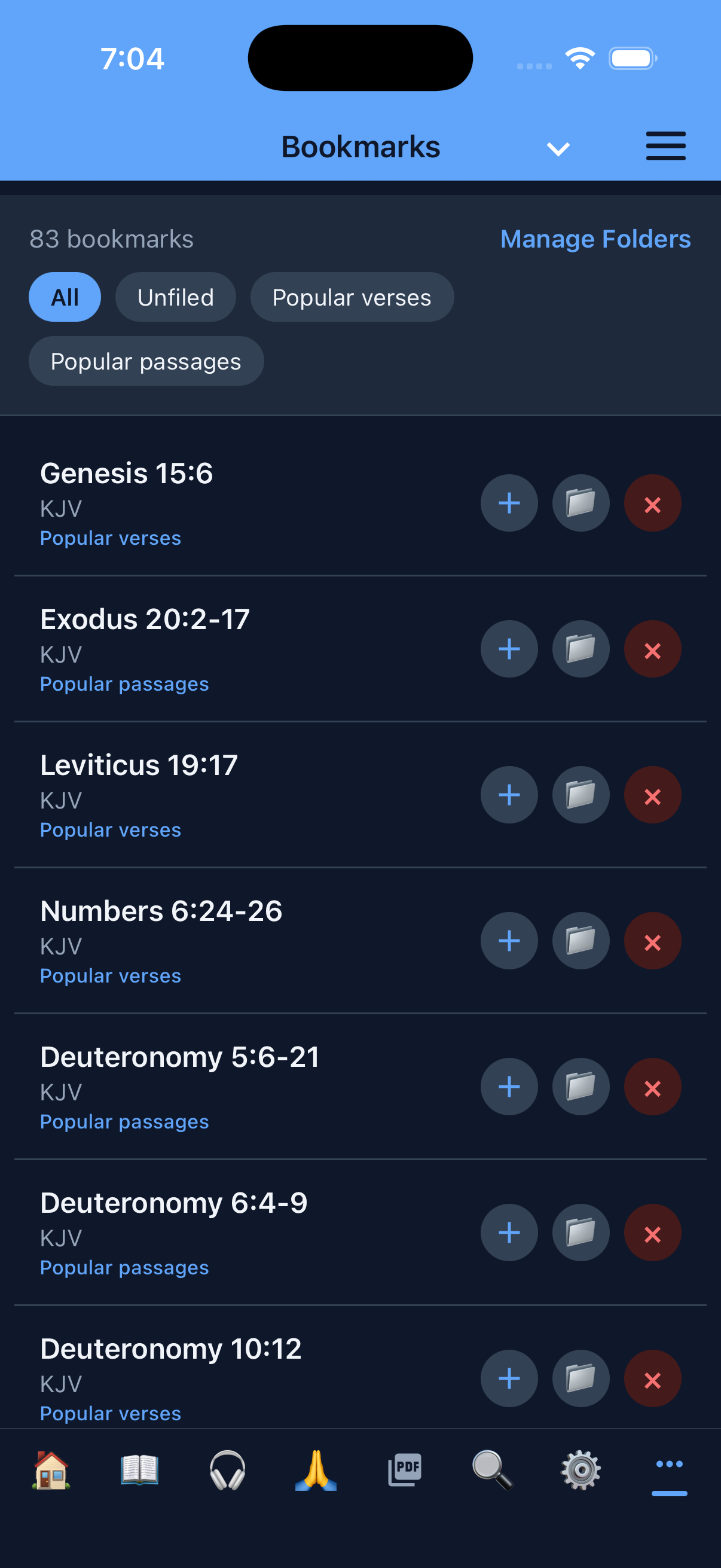
- Foldersతో bookmarks (Standard మరియు Scholar modes). Verse tag, folderలో file ("Sermon Prep," "Comfort," "Wedding readings"), later recall. Bookmark long-press folder move, Bookmarks tab నుండి new folders create.
- Per-color taggingతో highlights (Standard మరియు Scholar modes). Small palette ships; highlights verseకు stick అయి chapter reload survive.
- Bible notes మరియు study notes, రెండు scopes (Standard మరియు Scholar modes). Bible note specific verseకు anchor; study note free-form document notebook లో organize. రెండు deliberately separate, verse-anchored notes notebook drown చేయవు, notebook thought verse track పోకుండా.
- Everything export (Standard మరియు Scholar modes). Bookmarks, highlights, notes file లేదా clipboardకు export. Sermon-prep workflow, OneNote, Obsidian vault, email లో bring.
- Cloud, account, sync ఏదీ లేదు. Data device మీద. Privacy policy explains why choice.
పఠనం personalize చేయండి
- 27 interface languages. English, Simplified Chinese, Traditional Chinese, Spanish, Hindi, Arabic, Portuguese, Russian, German, French, Italian, Polish, Ukrainian, Romanian, Korean, Filipino, Vietnamese, Japanese, Indonesian, Dutch, Hebrew, Thai, Turkish, Greek, Czech, Swedish, మరియు Danish. Bible translation language independent of UI language, కాబట్టి Lithuanian Scripture Spanish interfaceతో, లేదా English Scripture Arabic interfaceతో read చేయవచ్చు.
- Automatic RTL support. OHGB (Hebrew) Bible open చేస్తే reader right-to-left flip; parallel view, verse numbers, highlights అన్నీ. English Bible switch చేస్తే chrome flip back.
- Themes. Standard మరియు dark. Theme system setting లేదా manual choice follow.
- Font size controls. Settings screen నుండి. Device accessibility text-size top of that respect.
- Default Bible మరియు parallel Bible (Standard మరియు Scholar modes). "Bible" tap చేసినప్పుడు ఏ translation opens set చేయండి, ఏది alongside show.
మూడు వినియోగదారు మోడ్లు
Theodia show చేయాల్సిన app amount choose చేసుకోనిస్తుంది. Study habitsకు సరిపోయే mode ఎంచుకోండి — లేదా Settingsలో anytime switch.
- Reader mode — పాఠ్యం, ఇతరం ఏమీ లేదు. Clean Bible reader bookmarks, highlights, notes, study tools లేవు. Devotional reading, public reading, లేదా Scripture apparatus లేకుండా కావాల్సిన anyone for ideal.
- Standard mode — read మరియు study. Reader mode అన్నింటితో bookmarks, highlights, notes, parallel Bibles, TTS, quick commands. Default mode మరియు most Bible study needs cover.
- Scholar mode — every tool unlocked. Standard mode అன్నింటితో commentaries, lexicons, word-level morphology, dictionary lookups, AI assistant (including AI-generated prayers), developer settings, catalog నుండి additional resources install ability.
Text-to-speech, built in
Bible, commentaries, books aloud listen చేయండి — Standard మరియు Scholar modesలో. TTS device's built-in voicesతో offline, stop button మరియు per-translation voice selection.
- Demand మీద read aloud. Any readerలో speaker icon tap current verse వద్ద TTS start. Stop button instantly pause.
- Translation ప్రతి per voice ఎంచుకోండి. ప్రతి Bible different TTS voice, English మరియు Hebrew texts distinct గా ధ్వనించడానికి.
- Background audio. Switch apps లేదా screen lock (iOS) అయినా TTS continue, walking, driving, chores సమయంలో listen.
- Optional parenthetical reading. Setting parentheses లోపల text include/skip, chapter headings మరియు cross-references flow interrupt చేయకుండా.
ఫోన్లకు మాత్రమే కాదు, టాబ్లెట్ల కోసం built
Theodia tablet (shorter edge 768dp లేదా larger screen) మీద run అవుతున్నప్పుడు recognize చేసి layout adapt extra space. Full tablet feature list →
- Side-by-side study panels. Tabletలో Study modeలో cross-references, commentary, compare, lexicon, dictionary panels right side నుండి persistent sidebarsగా slide in full screen cover బదులు. Leftలో passage read, rightలో study tool, place lose చేయకుండా.
- More generous margins మరియు larger touch targets. Books, chapters, reader screens wider padding, larger verse numbers, bigger buttons form factor native feel.
- Focus mode gets room to breathe. Clean page layout text comfortable line lengths మరియు paragraph spacing center — printed page more, phone screen less.
AI సహాయకుడు (optional, Scholar mode)
Theodia Theophilus పేరు AI assistant కలిగి ఉంది — read alongside, study questions answer, (permissionతో) app operate on your behalf. AI features entirely optional — AI off అయినా above described exactly work, AI phone home చేయదు. Learn more about Theophilus →
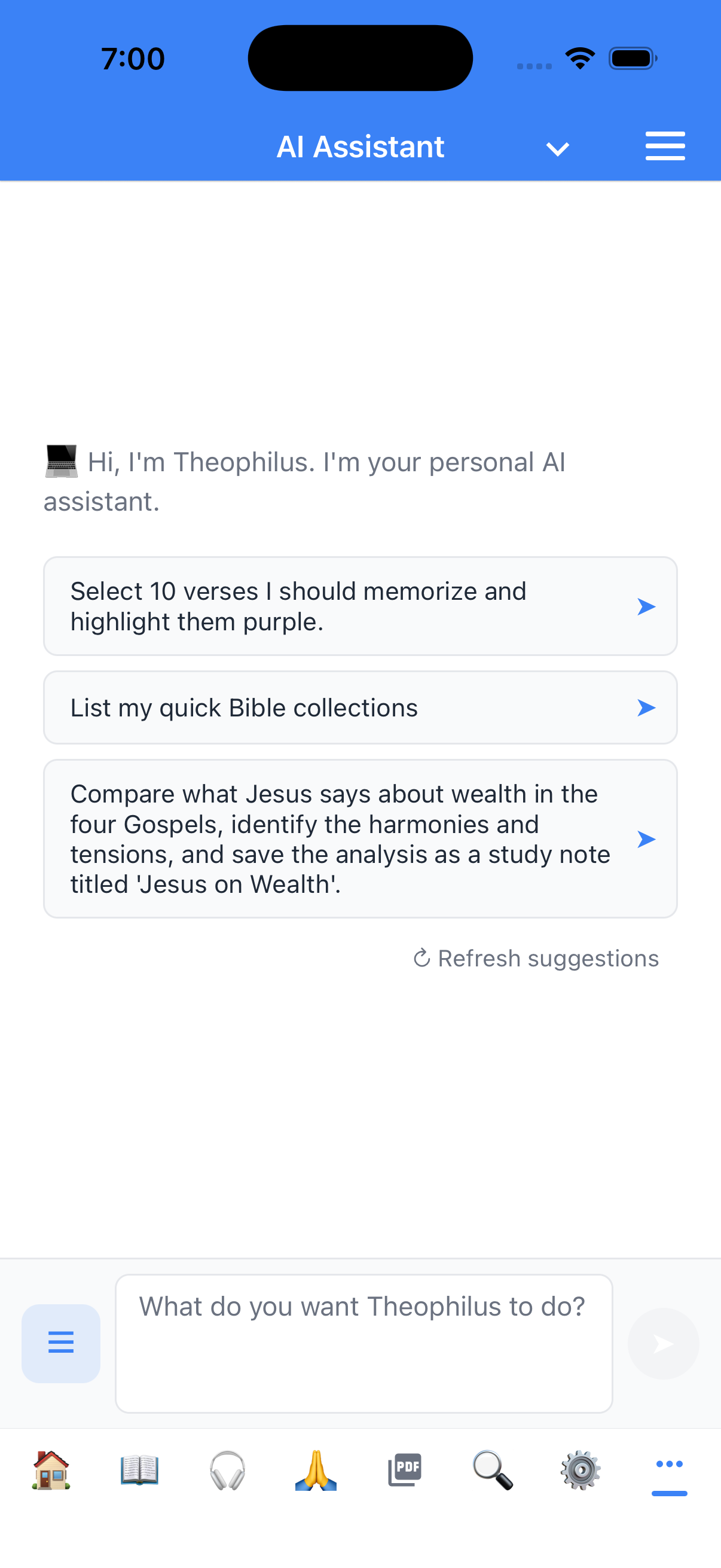
- Theophilus, your study companion. Theophilus any verse lookup, chapter summarize, every cross-reference pull, lexicon word lookup, conversation నుండి bookmark create, study note write — plain language ask చేస్తే.
- Tool-using, not just chat. Bible website top chatbot వలె బదులుగా, Theophilus same data layer wire అయి ఉంటుంది. "Romans 8:28లో Greek ఏమి చెబుతోంది" అడిగితే lexicon actually query చేస్తుంది, cached string కాదు.
- మీరు model ఎంచుకోండి. App any OpenAI-compatible endpoint talks — OpenAI, Anthropic (via proxy), self-hosted llama.cpp, Ollama server, Bible-specialized model — endpoint, model, API key Settingsలో configure. Theodia-branded model subscribe చేయవలసినది లేదు.
- Your API key secure enclaveలో. Settingsలో paste key iOS Keychain లేదా Android Keystoreలో store అయి, requests authenticate కోసం used, logged/mirrored లేదు.
- Projectsతో multi-conversation history. Named projects organize chats ("Sermon on Romans 8," "Genesis study group," "Personal devotions"), rename, archive, chat drawer నుండి switch.
- మీరు control లో. Theophilus note ఎప్పుడూ delete చేయదు, bookmark remove చేయదు, confirm లేకుండా setting change చేయదు. Tool surface deliberately conservative.
గోప్యత మరియు control, by default
Theodia's data architecture user experience తో same: user explicitly feature on చేస్తే మినహా ఏదీ device నుండి బయటకు వెళ్ళదు.
-
No account. No tracking. No analytics. App usage data
collect చేయదు, crash reporter phone home చేయదు, advertising SDK include
చేయదు. iOS privacy manifest declares
NSPrivacyTracking: false. - మీ data మీ device మీదే. Bookmarks, highlights, notes, AI conversation history, downloaded Bibles, downloaded models, GitHub PAT లేదా AI API key — app's private storage లేదా platform secure enclave.
- Export మరియు delete, granularly. Bookmarks, highlights, notes export చేయవచ్చు; per-category delete; uninstall data goes.
- Full privacy policy ఇక్కడ disclosure.