
پڑھنے کے دو طریقے
Theodia آپ کے ٹیکسٹ سے رابطے کے انداز کے لیے بنی ہے۔ وہ موڈ چنیں جو آپ کے mood سے match کرے — یا session کے درمیان switch کریں۔
- Focus mode — جیسے یہ ایک بالکل نیا جسمانی Bible ہو۔ صاف صفحہ، generous margins، چھوٹے verse numbers جو راستے سے ہٹ جائیں، اور text paragraphs میں laid out वن لائن verses کی بجائے۔ کوئی highlighting، کوئی links، کوئی buttons — صرف ٹیکسٹ، uninterrupted۔ devotional reading، public reading، memorization، یا jab Scripture book کی بجائے database جیسا feel ہو کے لیے بہترین۔
- Study mode — اپنے biblical scholar کو باہر نکالیں۔ ہر verse ایک doorway ہے: tap کریں cross-references کھولنے کے لیے، translations compare کریں، commentary پڑھیں، یا original language data چیک کریں۔ تمام apparatus ek tap دور ہے، اور سب کچھ fully offline۔
Bible پڑھیں، بھرپور آف لائن
Theodia ka whole reason for existing: an honest, fast, ad-free Bible reader jo moment you open the app work kare، with no network connection، no login، اور no subscription۔
-
ایپ میں نو Bible translations bundled۔ Open the app on a
plane، in a basement، on a phone you bought used with no SIM card — the bundled
translations are already there، and the reader is instant۔
- Public domain: KJV، KJV with Strong's numbers (KJVx)، WEB۔
- Modern English: BSB (Berean Study Bible)۔
- Translation-oriented: ULT (UnfoldingWord Literal Text)، UST (UnfoldingWord Simplified Text)۔
- Hebrew interlinear: OHGB (Open Hebrew Greek Bible) with Strong's-aligned data۔
- Transliteral Bible: TRLIT، TRLIT with Strong's (TRLITx)۔
- Install more from the in-app catalog۔ If you want a translation we don't bundle (or a newer revision of one we do)، the Resources screen pulls it straight from a GitHub release۔ No account، no store transaction — you point the app at a public release tag and the file downloads into the app's private storage۔
- Parallel Bible view۔ Read two translations side by side، verse by verse۔ Useful for translation comparison یا for the literal-vs-dynamic tension (ULT next to UST، KJV next to BSB، etc)۔ The pairing is yours to set — pick any of the in-app translations۔
- Compare any verse across every translation۔ The Compare screen lays out a single verse across all installed Bibles in one view۔
مطالعہ، with tools built in
Theodia isn't a reader with study tools bolted on۔ The same offline-first design extends to the apparatus — commentaries، lexicons، cross-references، morphology — so the study flow works the same way on a flight as it does at your desk۔
- Two commentaries, bundled (Scholar mode)۔ Matthew Henry's complete commentary and the AIC (AI Generated Commentary) ship with the app۔ Tap any verse to see Henry and AIC on it، instantly، offline۔
- Strong's-aligned lexicon, bundled (Scholar mode)۔ Look up any word by Strong's number، by English gloss، یا by tapping it in the interlinear view۔ The bundled TRLIT (Transliteral Bible) lexicon covers Hebrew and Greek entries with definitions، transliterations، and parsing data۔ Additional lexicons are available from the in-app catalog۔
- Cross-references for every verse (Scholar mode)۔ The cross-reference database is the same one the project was built around from the start۔ Tap a verse، see the related verses؛ tap a related verse، see its related verses۔ The graph is dense and worth getting lost in۔
- Morphology and word data on the original languages (Scholar mode)۔ The Hebrew and Greek source text ships with parsing data، so tapping a word in OHGB یا TRLIT shows its part of speech، root، tense، voice، mood — the things pastors and language students need۔
- Focus Mode for distraction-free reading۔ A clean single-bible view that strips the chrome and leaves the text۔ Tap-and-hold a verse to bring the menu back۔
- Devotional library, offline۔ A classic devotional bundled — Smith's Believer's Daily Remembrance — with a calendar-style picker so you can read today's entry or jump to any date in the year۔
Encyclopedia، built in and expandable
Theodia ships with a full biblical encyclopedia right in the app، and you can add more classic reference works from the in-app catalog۔ Every article is searchable، readable offline، and connected to the rest of your library۔
- Kitto’s Cyclopedia of Biblical Literature (KIT)، bundled۔ Thousands of articles on people، places، events، and topics — available the moment you install the app، with no download or account required۔
- Search across encyclopedias۔ Look up any entry by name and jump straight to the article۔ Results work across every installed encyclopedia from a single search screen۔
- Linked articles and verses۔ Encyclopedia entries link to related articles and to the Bible passages they cite۔ Tap a link to open the entry or the verse without losing your place۔
- Install more from the catalog۔ Download additional classic encyclopedias — including McClintock and Strong، Hastings’ Dictionary of the Bible، the International Standard Bible Encyclopedia، and more — straight from the in-app resource catalog under Settings → Manage Resources۔
Dictionaries for deeper word study
In addition to the bundled Strong's-aligned lexicon، Theodia lets you install and search classic Bible dictionaries۔ Look up names، places، doctrines، and theological terms without leaving the verse you're reading۔
- Strong's-aligned lexicon، bundled۔ Tap any Hebrew or Greek word in the interlinear view to see its Strong's number، gloss، transliteration، and parsing data۔
- Bible dictionaries۔ Add reference works from the in-app catalog the same way you add Bibles، commentaries، and encyclopedias۔
- Verse-aware lookups۔ In Study mode، open the dictionary panel for any verse to see relevant entries drawn from your installed dictionaries۔
- Cross-linked with everything else۔ Dictionary entries link back to verses، encyclopedia articles، and lexicon entries so you can follow a word through every layer of the library۔
دعا کا companion، built in
Theodia includes a dedicated prayer helper jo bookmarked verse se beyond hota hai۔ Track prayer requests، build personal routines، follow classic prayers and creeds، keep a prayer journal، and let guided sessions walk you through a time of prayer — all offline، all on your device۔ Prayer tools appear in every user mode؛ generating prayers with the AI assistant requires Scholar mode۔

- Prayer requests۔ Keep a list of what you're praying for — family، healing، work، the church۔ Organize requests into folders، tag them، set priorities and reminders، and mark them answered when God moves۔ Running notes let you log updates as a request develops۔
- Prayer routines۔ Build your own step-by-step prayer path: a passage to read، a creed to recite، your prayer list، a hymn، a moment of silence، a devotional — in any order، with per-step durations۔ Pin a routine to the Prayer home screen so your morning یا evening prayer is one tap away۔
- Creeds and fixed prayers۔ The Lord's Prayer، the Apostles' Creed، the Nicene Creed، the Shema، the Gloria Patri، and more — ready to read or have read aloud۔ Create your own fixed prayers too، and reuse them as steps in your routines۔
- Guided prayer sessions۔ Audio-guided sessions walk you through a time of prayer step by step — prompts، scripture، and reflection — with adjustable pacing and optional ambient sound۔
- Prayer journal۔ Capture what you prayed، what you're grateful for، and what God is teaching you۔ Entries link back to the requests they came from، and journal templates give you a starting prompt when the page is blank۔
- Prayer timer۔ A simple timer for open-ended prayer، with presets، start and end bells، ambient sounds (rain، ocean، wind، fire، birds)، a candle یا breathing guide، and an optional journal prompt when time is up۔
- Lectionary schedules۔ Follow a daily scripture reading plan — Old Testament، Psalm، Epistle، Gospel — from classic lectionaries، or build your own schedule۔
- AI-generated prayers (optional, Scholar mode)۔ With Theophilus enabled، generate a personal prayer from a request یا journal entry، in a persona and mood you choose — then save it as a fixed prayer or append it to your journal۔
- Install more from the catalog۔ Download additional prayer packs — creeds and fixed prayers، guided sessions، lectionaries، and routines — from the in-app catalog، or package and share your own۔
سننے کے لیے پلے لسٹ
Turn scripture into something you listen to۔ Build playlists of Bible passages، audio tracks، and your own text، then play them back in order with text-to-speech یا MP3 audio — a personal audio Bible for your commute، your walk، یا your wind-down۔ Available in every user mode۔

- Build your own playlists۔ Add Bible passages، audio files یا URLs، and plain text as tracks۔ Reorder them، batch-add a list of references at once، and organize playlists with categories and tags۔
- Play with full playback controls۔ Play، pause، shuffle، repeat (all یا one)، adjustable speed، and a sleep timer۔ Resume a playlist right where you left off۔
- Per-track voices۔ Choose a different TTS voice for each track، یا pick a "random favorite" voice that varies the reading each time۔ Control whether parenthetical text and verse references are read aloud۔
- Works offline۔ Bible passage tracks read from your installed translations؛ audio tracks can be downloaded and cached to the device so they play without a connection۔
- Jump to the verse۔ Tap any track to open its passage in the Bible reader، so you can follow along or keep studying from where you left off۔
- Share and import۔ Export playlists as JSON یا Theoscript، import playlists others have shared، and install playlist plugins from GitHub۔
PDFs، read and organized in the app
Bring your own documents into Theodia۔ Import، categorize، and read PDFs right alongside your Bible — all stored on your device، so they work offline۔ Available in Standard and Scholar modes۔
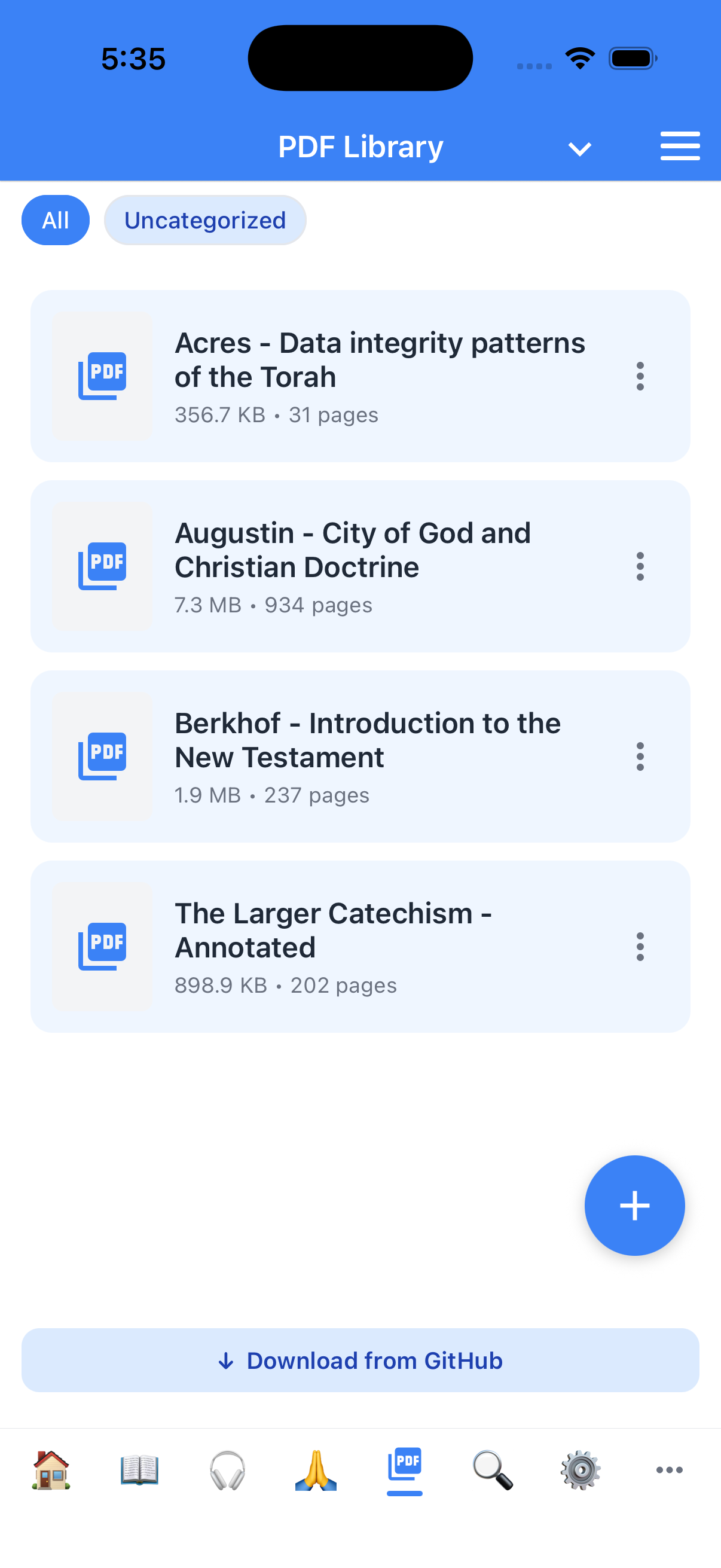
- Import and organize۔ Tap the PDFs tab، use the + button to import a PDF from your device، and assign it a category for easy browsing۔
- Page navigation۔ Jump with first/previous/next/last page، tap the page number to open a grid of pages، یا use arrow keys on an external keyboard۔
- Zoom and bookmarks۔ Zoom in and out with reset، and save named bookmarks per PDF۔ Each PDF keeps its own bookmark list۔
- Search, contents, and text view۔ Search within a PDF when searchable text is available، browse a built-in table of contents، and open the current page as plain text to copy، share، یا add to study notes۔
- Listen and resume۔ Read a PDF page aloud with TTS، and reopen any PDF right where you left off۔ Listen and search are enabled when searchable text is installed۔
- Scholar extras۔ In Scholar mode، download packaged PDFs from GitHub alongside the community library۔
تلاش، the way you'd expect
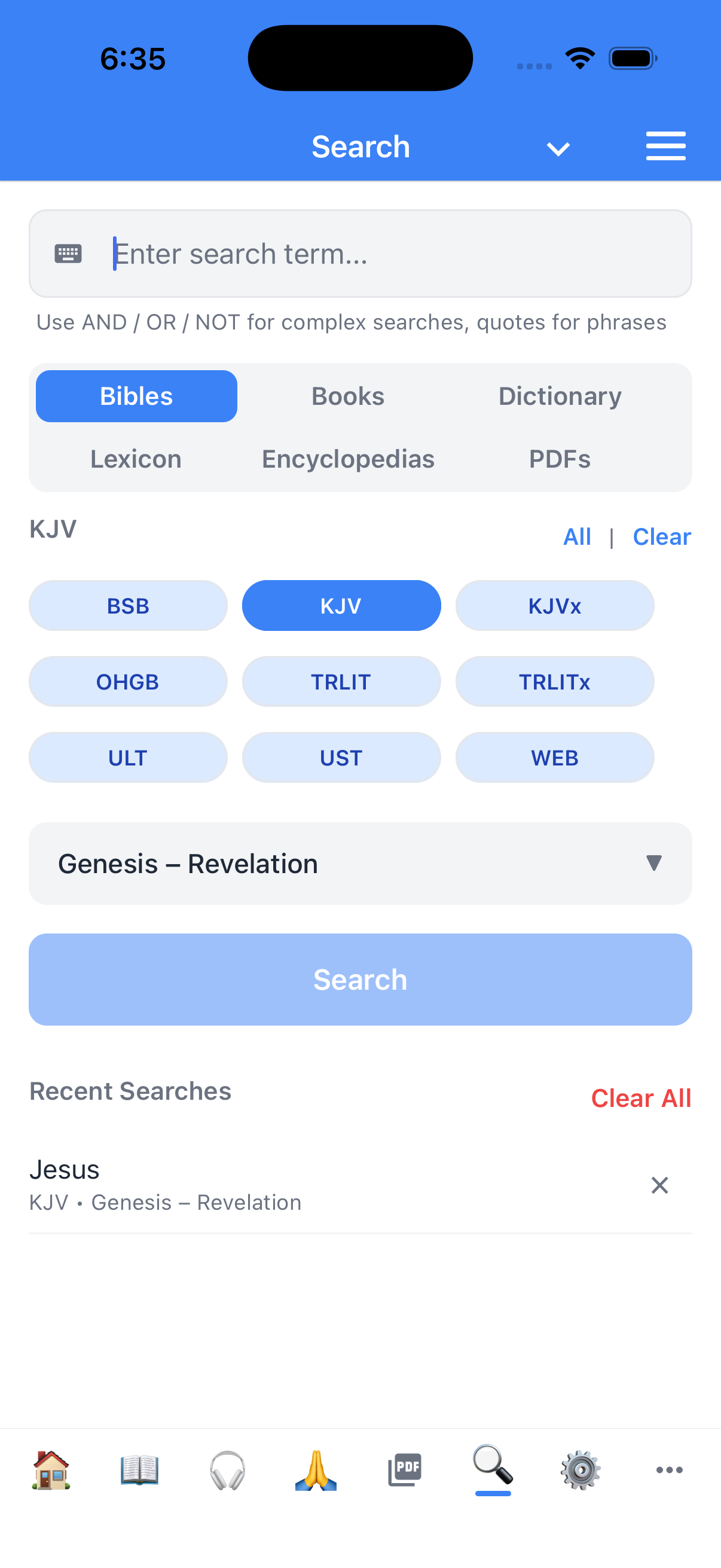
- Full-text search across every translation at once۔ Type a word or a phrase؛ the results screen shows the hits grouped by book and chapter، with the matching verse in context۔
- Filter by translation۔ If you only want to search the Greek word "agape" inside the BSB interlinear، you can۔
- Jump to the verse from the result۔ One tap and you're in the reader، with the verse highlighted۔
بُک مارکس، highlights، and notes — all yours، all local
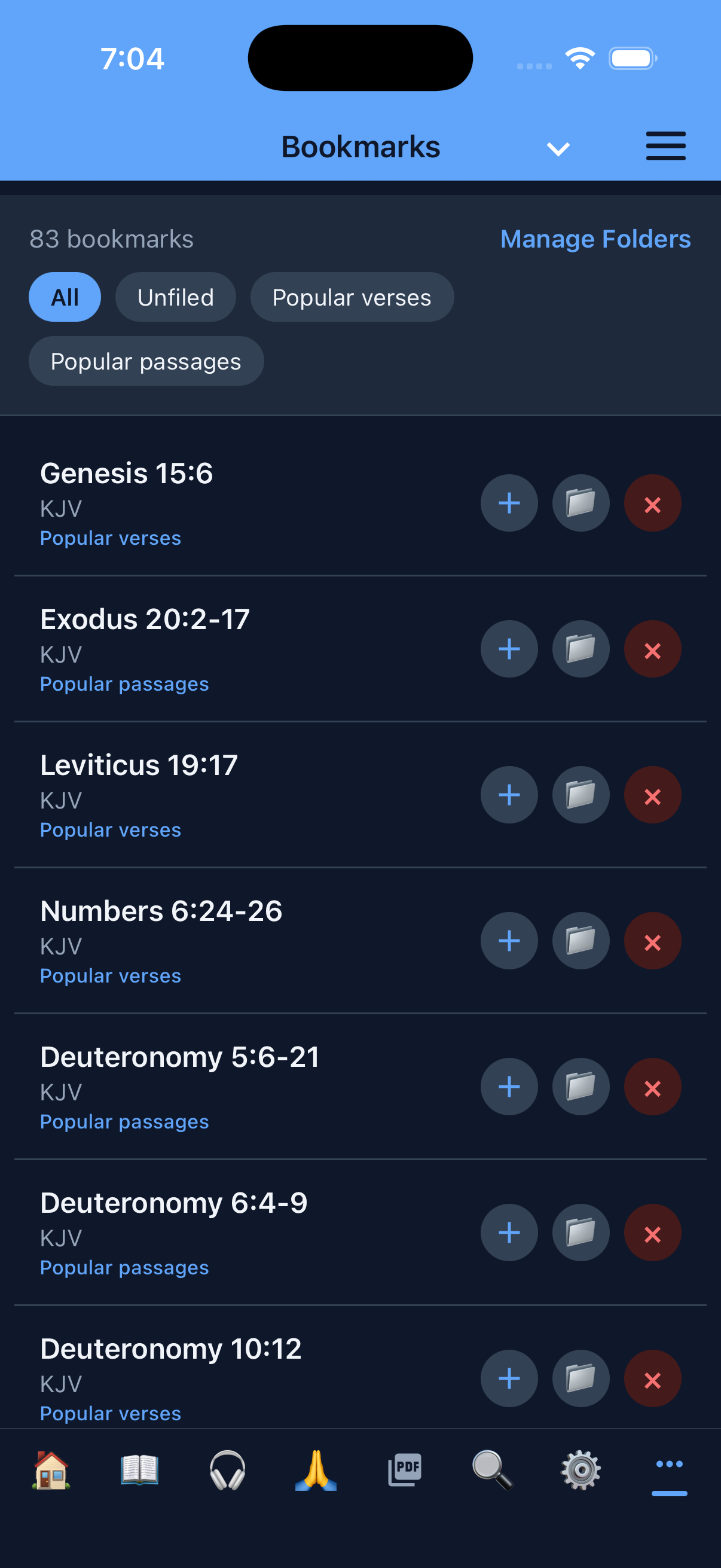
- Bookmarks with folders (Standard and Scholar modes)۔ Tag a verse، file it in a folder ("Sermon Prep"، "Comfort"، "Wedding readings")، recall it later۔ Long-press a bookmark to move it between folders، and create new folders from the Bookmarks tab۔
- Highlights with per-color tagging (Standard and Scholar modes)۔ The app ships with a small palette؛ the highlights stick to the verse and survive a chapter reload۔
- Bible notes and study notes، with two different scopes (Standard and Scholar modes)۔ A Bible note is anchored to a specific verse؛ a study note is a free-form document that lives in a notebook you organize yourself۔ The two are deliberately separate so verse-anchored notes don't drown the notebook، and the notebook doesn't lose track of which verse a thought came from۔
- Export everything (Standard and Scholar modes)۔ Bookmarks، highlights، and notes can be exported to a file or to the clipboard۔ Bring them into your sermon-prep workflow، your OneNote، your Obsidian vault، your email۔
- No cloud، no account، no sync۔ The data lives on the device۔ The privacy policy explains why we made that choice۔
شخصی سازی پڑھائی
- 27 interface زبانیں۔ English، Simplified Chinese، Traditional Chinese، Spanish، Hindi، Arabic، Portuguese، Russian، German، French، Italian، Polish، Ukrainian، Romanian، Korean، Filipino، Vietnamese، Japanese، Indonesian، Dutch، Hebrew، Thai، Turkish، Greek، Czech، Swedish، اور Danish۔ The Bible translation language is independent of the UI language، so you can read Lithuanian Scripture with a Spanish interface، or English Scripture with an Arabic interface۔
- RTL support، automatic۔ Open an OHGB (Hebrew) Bible and the reader flips to right-to-left؛ the parallel view، the verse numbers، the highlights — all of it۔ Switch to an English Bible and the chrome flips back۔
- Themes۔ Standard and dark۔ The theme follows the system setting or your manual choice، whichever you prefer۔
- Font size controls۔ From the Settings screen۔ The reader respects your device's accessibility text-size setting on top of that۔
- Default Bible and parallel Bible (Standard and Scholar modes)۔ Set which translation opens when you tap "Bible"، and which one shows up alongside it۔
تین صارف موڈز
Theodia lets you choose how much of the app to show۔ Pick the mode that fits your study habits — یا switch anytime in Settings۔
- Reader mode — صرف ٹیکسٹ، کچھ نہیں۔ A clean Bible reader with no bookmarks، highlights، notes، یا study tools۔ Ideal for devotional reading، public reading، یا anyone who wants Scripture without apparatus۔
- Standard mode — پڑھیں اور مطالعہ کریں۔ Everything in Reader mode plus bookmarks، highlights، notes، parallel Bibles، TTS، and quick commands۔ This is the default mode and covers most Bible study needs۔
- Scholar mode — ہر tool unlocked۔ Everything in Standard mode plus commentaries، lexicons، word-level morphology، dictionary lookups، the AI assistant (including AI-generated prayers)، developer settings، and the ability to install additional resources from the catalog۔
Text-to-speech، built in
Listen to the Bible، commentaries، and books aloud — in Standard and Scholar modes۔ TTS works offline using your device's built-in voices، with a stop button and per-translation voice selection۔
- Read aloud on demand۔ Tap the speaker icon in any reader to start TTS at the current verse۔ A stop button lets you pause instantly۔
- Pick a voice per translation۔ Choose a different TTS voice for each Bible so English and Hebrew texts sound distinct۔
- Background audio۔ TTS continues when you switch apps یا lock the screen (iOS)، so you can listen while walking، driving، یا doing chores۔
- Optional parenthetical reading۔ A setting lets you include یا skip text inside parentheses، so chapter headings and cross-references don't interrupt the flow۔
ٹیبلیٹز کے لیے، نہ صرف phones
Theodia recognizes when it's running on a tablet (any screen where the shorter edge is 768dp or larger) and adapts the layout to use the extra space۔ پوری ٹیبلیٹ feature list پڑھیں →
- Side-by-side study panels۔ In Study mode on a tablet، cross-references، commentary، compare، lexicon، and dictionary panels slide in from the right as persistent sidebars instead of covering the full screen۔ You read the passage on the left and the study tool on the right، without losing your place۔
- More generous margins and larger touch targets۔ Books، chapters، and reader screens all get wider padding، larger verse numbers، and bigger buttons so the app feels native to the form factor۔
- Focus mode gets room to breathe۔ The clean page layout centers the text with comfortable line lengths and paragraph spacing — more like a printed page، less like a phone screen۔
AI assistant (اختیاری، Scholar mode)
Theodia includes an AI assistant named Theophilus that can read alongside you، answer study questions، and (with your permission) operate the app on your behalf۔ The AI features are entirely optional — Theodia works exactly as described above with the AI turned off، and the AI does not phone home۔ Theophilus کے بارے میں مزید جانیں →
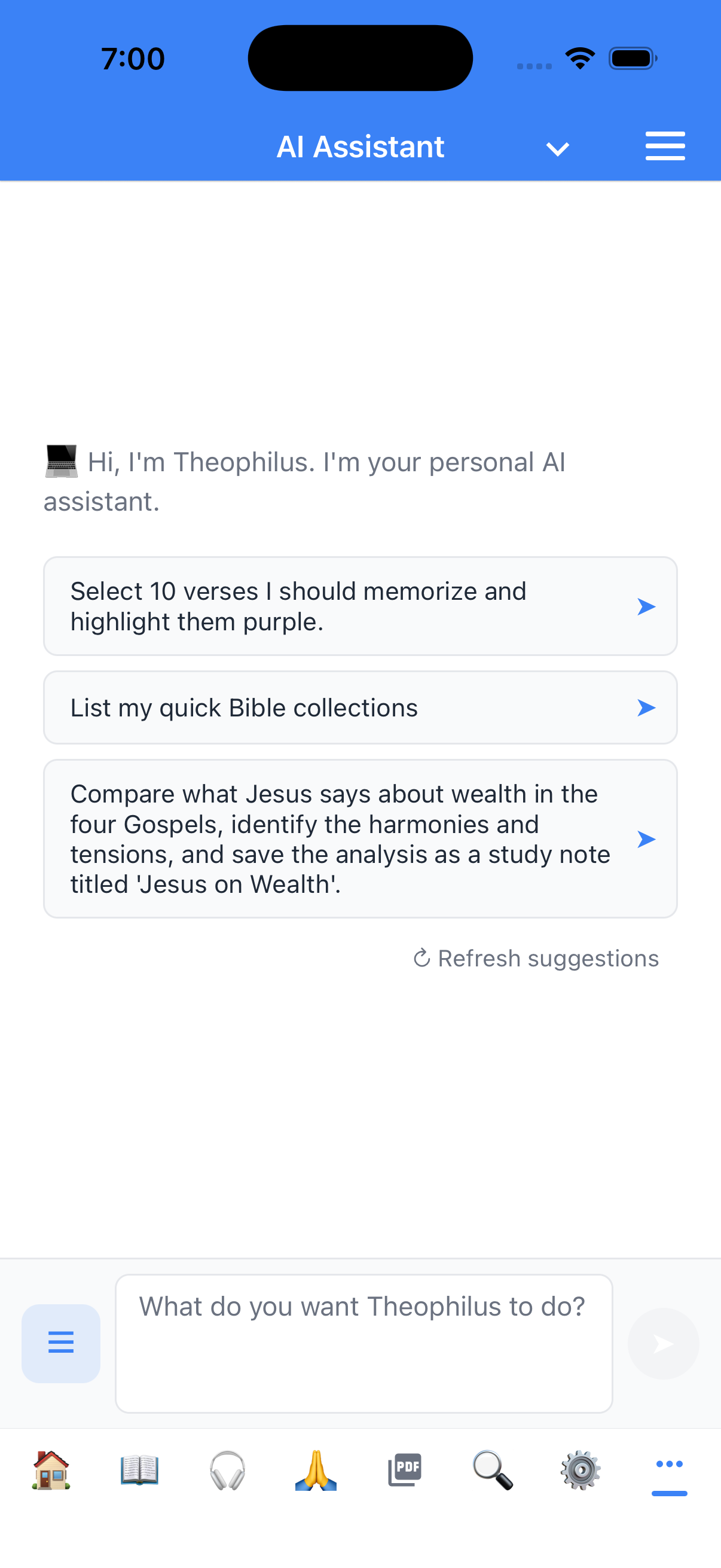
- Theophilus، your study companion۔ Theophilus can look up any verse، summarize a chapter، pull every cross-reference for a passage، look up a word in the lexicon، create a bookmark from a conversation، and write a study note for you — all by asking in plain language۔
- Tool-using، not just chat۔ Unlike a chatbot bolted on top of a Bible website، Theophilus is wired into the same data layer the rest of the app uses۔ When you ask "what does the Greek say in Romans 8:28،" it actually queries the lexicon، not a cached string۔
- You choose the model۔ The app talks to any OpenAI-compatible endpoint — OpenAI، Anthropic (via a proxy)، a self-hosted llama.cpp، an Ollama server، or a Bible-specialized model — and you configure the endpoint، the model، and the API key in Settings۔ There is no Theodia-branded model you have to subscribe to۔
- Your API key stays in the secure enclave۔ The key you paste into Settings is stored in the iOS Keychain یا Android Keystore، used to authenticate the requests you send، and never logged or mirrored۔
- Multi-conversation history with projects۔ Organize chats into named projects ("Sermon on Romans 8"، "Genesis study group"، "Personal devotions")، rename them، archive them، and switch between them from the chat drawer۔
- You stay in control۔ Theophilus never deletes a note، never removes a bookmark، and never changes a setting without you confirming۔ The tool surface is deliberately conservative۔
رازداری اور control، by default
Theodia's data architecture is the same architecture the user experiences: nothing leaves the device unless the user explicitly turns on a feature that needs it۔
-
No account۔ No tracking۔ No analytics۔ The app does not collect
usage data، does not include a crash reporter that phones home، and does not
include an advertising SDK۔ The iOS privacy manifest declares
NSPrivacyTracking: false۔ - All your data is on your device۔ Bookmarks، highlights، notes، AI conversation history، downloaded Bibles، downloaded models، and the GitHub PAT یا AI API key you may have added — all of it lives in the app's private storage یا the platform's secure enclave۔
- Export and delete، granularly۔ You can export bookmarks، highlights، and notes؛ you can delete them per-category؛ you can uninstall the app and the data goes with it۔
- Read the full privacy policy for the disclosure۔